We’ve all been there. You spend 20 minutes documenting a complex edge case, only for a developer to comment, "Can’t Reproduce", and close the ticket two hours later.
It’s frustrating. But in 2026, with the speed of CI/CD, developers don't have time to read "novels." They need surgical precision. If you want your bugs fixed in the first sprint, you need to stop reporting "what happened" and start providing "the environment for the fix".
Here is the 2026 framework for the perfect bug report.
1. The "Video First" Rule 🎥
If a picture is worth a thousand words, a 10-second screen recording is worth a thousand Jira comments.
Don’t just record the bug. Record the Network Tab or the Console simultaneously.
2. Ditch the Manual Specs, Use Metadata 🤖
Stop typing out "Chrome version 124.0.x on Windows 11." It’s 2026; that should be automated.
Use browser extensions or QA helper tools to dump the session JSON directly into the report.
It allows the dev to spoof your exact environment in one click rather than trying to recreate it manually.
3. The "Expected vs. Reality" Gap (Business Edition) 💼
Developers prioritize impact, not just "brokenness."
Bad: "The button doesn't work"
Good: "The 'Submit' button fails on mobile-safari, preventing users from completing the checkout flow (High Priority)"
4. Traceability: The Missing Link 🔗
A bug without a "parent" is an orphan.
Always link the bug back to the original Test Case.
This proves that the bug isn't a "one-off" user error but a failure of a specific validated requirement. This is where a dedicated management tool like TestCaseLab keeps your history clean and searchable.
The Trigger: (What specific action broke the logic?)
Expected Result: [Requirement Link/Description]
Actual Result: [The actual failure]
Log Snippet: [Paste relevant 3 lines of console error]
Stop being a "messenger" and start being a "solver." Quality reporting isn't about pointing out what’s wrong; it's about making it impossible for the dev not to fix it.
How do you handle "Won't Fix" disputes in your team? Let’s talk in the comments.
“Everyone owns quality” is one of the most widely repeated principles in modern software development.
The idea is easy to support. Product quality depends on decisions made throughout the entire delivery process. Requirements, architecture, design, code, infrastructure, testing, deployment, and customer support all influence the final experience.
A QA team cannot repair every quality problem at the end of development.
Shared ownership encourages earlier conversations, faster feedback, and wider responsibility. It can also create confusion when teams interpret it as a reason to remove clear ownership from the quality process.
When everyone owns quality in principle, who makes sure the essential work actually happens?
Quality begins before a test case exists
A product can inherit quality problems before development starts.
A requirement may contain conflicting rules. A design may overlook an important error state. A technical decision may create unnecessary complexity. A delivery deadline may leave no room for realistic validation.
QA professionals can contribute during these stages by asking questions, identifying risks, and helping the team define observable acceptance criteria.
Testing practices are increasingly distributed throughout the software development lifecycle. Applause reported in 2025 that only 15% of surveyed organizations limited testing to a single SDLC stage, compared with 42% in an earlier study. More than half included quality activities during planning, design, development, and maintenance.
This is a positive shift. It allows teams to discover problems while they are still relatively inexpensive to address.
It also means that quality work spans more roles, meetings, tools, and stages than before.
Shared ownership needs specific responsibilities
A team may agree that quality belongs to everyone while holding very different expectations about what each person should do.
A product manager may expect QA to identify every missing requirement. QA may expect the product manager to define all business rules. Developers may expect automation to cover regression risk. Leadership may expect the release dashboard to provide certainty.
These assumptions usually become visible when something fails.
Clear responsibilities make collaboration easier.
Product managers can own business intent, priorities, and acceptance decisions. Developers can own implementation quality, code-level tests, reviews, and technical observability. Designers can own interaction clarity, consistency, and accessibility decisions. Operations teams can provide production insight, monitoring, and incident data.
QA can own or coordinate the testing strategy, risk analysis, coverage visibility, exploratory investigation, test evidence, and release-quality communication.
The exact division will vary by team. The important point is that the work has a visible owner.
QA provides a connected view of risk
Individual contributors naturally focus on the part of the product closest to their work.
A developer may verify that a service behaves correctly. A designer may confirm that the interface matches the intended flow. A product manager may confirm that the feature meets the business objective.
QA often examines the connections between these perspectives.
What happens when the service is slow? Does the interface explain the failure? Can the user recover? Does the feature behave correctly for every role? Has an existing workflow changed? Is the data still accurate after several related actions?
This wider view becomes increasingly important as products depend on multiple services, devices, permissions, external APIs, and data states.
QA ownership therefore includes more than executing test cases. It includes making risk visible across the product.
Automation does not coordinate quality ownership
Automated tests can provide fast and repeatable feedback. They can protect stable behaviour, detect regressions, and support frequent delivery.
They still require strategic decisions.
Which scenarios deserve automation? Which layer should contain each check? Which tests are duplicated? Which failures block a release? Which unstable tests need investigation? Which critical risks remain outside automated coverage?
Without coordination, automation suites can grow faster than their value.
A team may celebrate a high automation percentage while critical business journeys remain weakly tested. Another team may run thousands of checks while spending hours investigating unreliable failures.
Someone needs to connect automation activity with product risk and release decisions. That responsibility often sits with a QA lead, test architect, or experienced quality engineer, even when implementation is shared across the team.
AI makes coordination more important
AI-assisted development can produce working code and test drafts quickly.
This increases the amount of output that teams can create. It also increases the amount of output that needs to be understood and verified.
The World Quality Report 2025–26 found that 43% of organizations were experimenting with generative AI in QA, while only 15% had scaled it across the enterprise. This gap suggests that adoption is moving faster than mature operating models in many organizations.
Vibe-coding research highlights a similar challenge. A 2026 survey of 162 vibe coders found that awareness of AI-related risks was widespread, but the ability to evaluate and verify generated software varied with experience.
AI can generate a feature, test case, or automation script. The team still needs to decide whether the output reflects the requirement, covers meaningful risks, duplicates existing work, or introduces assumptions.
Shared quality ownership gives more people the opportunity to use AI. Clear quality coordination helps them use it responsibly.
Release readiness needs one coherent picture
Before release, information may be spread across many places:
requirements in a project management tool;
code and automated checks in the repository;
manual test results in a test management system;
defects in an issue tracker;
deployment information in the CI/CD platform;
known risks in meetings and chat messages;
production trends in monitoring tools.
Each source contains part of the truth.
Someone needs to bring those parts together and answer practical questions.
Were the most important changes tested? Which critical scenarios remain blocked? What is the impact of open defects? Are the failures understood? What assumptions are still unverified? What risks are being accepted?
The release decision may belong to product or business leadership. QA can provide the structured evidence needed to make that decision responsibly.
A QA team should enable ownership across the organization
Strong QA teams do not try to become the only people allowed to discuss quality.
They help other roles participate effectively.
They provide reusable test scenarios, clear risk models, accessible reports, testing guidance, and shared workflows. They help developers understand customer-impacting failures. They help product managers express testable expectations. They help leadership understand the difference between execution progress and product confidence.
A test management system can support this approach by creating one shared location for test cases, test runs, results, milestones, and reporting.
The tool does not create quality ownership by itself. It gives the team a structure in which ownership can become visible.
Questions every team should answer
Teams that believe everyone owns quality should be able to answer several questions clearly.
Who identifies product risks?
Who defines the testing approach for a change?
Who maintains regression coverage?
Who investigates gaps between requirements and implementation?
Who decides whether the available evidence is sufficient for release?
Who reviews production failures and updates the testing strategy?
Several people may contribute to each activity. One person or role should still coordinate the outcome.
Shared ownership works through clarity
Quality improves when more people participate in it.
Developers should care about user impact. Product managers should care about testability. Designers should care about failure states. Operations teams should care about feedback from production. QA should help connect these concerns into a coherent quality strategy.
The phrase “everyone owns quality” becomes useful when teams translate it into specific behaviours, responsibilities, and decisions.
How has your team divided quality responsibilities across product, development, and QA?
In 2026, one of the most expensive habits in QA is still alive: massive regression suites that nobody fully trusts, nobody fully reads, and nobody can run fast enough.
What used to be a sign of maturity is now a bottleneck.
500-step test scenarios.
Monolithic test plans.
End-to-end flows that break with every small change.
Meanwhile, development has changed completely.
AI is generating features in minutes.
Releases happen continuously.
Logic evolves faster than documentation.
And yet many QA teams are still trying to validate this speed with structures designed for a slower era. This mismatch is where quality starts to fail.
The Problem with Traditional Regression Thinking
Regression suites were built around one core idea: If we test everything together, we reduce risk. That assumption no longer holds.
In AI-driven development, regression suites introduce three critical issues:
1. They are too slow to execute
By the time a full suite runs, the system may already have changed
2. They are too rigid to adapt
Small updates require rewriting large portions of tests
3. They hide real risk
When everything is tested together, it becomes harder to isolate what actually failed
Most importantly, they assume stability. And in 2026, stability is no longer the default state of software.
From Regression to Atomic Validation
Modern QA teams are shifting toward a different principle: Validate small, independent units of logic that can be reused, combined, and executed instantly.
This approach is called Atomic Validation.
Instead of building large end-to-end scenarios, teams create modular test units that focus on:
One behavior
One rule
One expectation
These units can then be:
Reused across multiple features
Combined dynamically into test runs
Executed selectively based on risk
This is how QA keeps up with continuous delivery.
What “Atomic” Actually Means in Practice
Atomic testing is not about writing smaller tests just for the sake of it. It is about changing how you think about validation.
An atomic test case should:
✔️ Validate a single piece of logic
✔️ Have a clear expected outcome
✔️ Be independent from other tests
✔️ Be reusable across contexts
Example
Instead of: “Verify full checkout flow with discount, login, payment, and confirmation”
You break it into:
Discount calculation logic
Login session validation
Payment processing outcome
Order confirmation rules
Each piece becomes testable, reusable, and easier to debug.
Why Atomic Validation Works in 2026
This approach aligns with how modern systems behave:
AI-generated code is modular by nature
It builds components, not monoliths
Bugs are more contextual
They often live in specific logic blocks, not full flows
Speed requires selectivity
You cannot test everything every time
Atomic validation allows QA teams to:
Test only what changed
React instantly to updates
Reduce noise in bug detection
The Hidden Benefit: Faster Root Cause Analysis
One of the biggest advantages of atomic testing is clarity.
When a large regression test fails, teams ask:
“What broke?”
When an atomic test fails, teams know:
“This specific rule is broken.”
That difference can save hours, or even days, of debugging time.
How to Transition from Legacy Suites to Atomic QA
Moving away from regression-heavy structures does not require rebuilding everything from scratch.
It requires systematic decomposition.
Step 1: Identify Core Logic Blocks
Break down large test cases into smaller validation points
Step 2: Remove Redundancy
Eliminate repeated steps across test cases
Step 3: Isolate Dependencies
Ensure each test can run independently
Step 4: Define Clear Outcomes
Each test should answer one question only
This process turns heavy suites into flexible systems.
Structuring Atomic QA in TestCaseLab
To make Atomic Validation scalable, structure matters.
Platforms like TestCaseLab enable teams to organize testing in a modular way.
Here is how modern QA teams structure their work:
1. Test Suites by Feature or “Vibe”
Instead of one large regression suite, organize tests by feature modules
This allows:
Faster navigation
Targeted execution
Better ownership across teams
2. Reusable Test Plans
Create collections of atomic tests that can be reused across releases
Instead of rebuilding test runs:
Select relevant modules
Combine them instantly
Execute based on current risk
3. Requirement Linking
Every test case is connected to a requirement
This ensures:
Full coverage visibility
Easier impact analysis
Better alignment between intent and validation
Common Mistakes When Going Atomic
Many teams attempt this shift but fall into new traps:
Making tests too granular
Atomic does not mean meaningless micro-steps
Losing business context
Even small tests must reflect real user impact
Overcomplicating structure
The goal is flexibility, not bureaucracy
Atomic QA should simplify, not fragment.
The Future of QA Is Selective, Not Exhaustive
The biggest mindset shift in 2026 is this:
Quality is no longer about testing everything. It is about testing the right things at the right time.
Atomic Validation enables this by giving QA teams control over:
What to test
When to test
Why it matters
Final Thought: Quality Is a Pulse, Not a Phase
In fast-moving environments, quality cannot be a final checkpoint. It must be continuous, adaptive, and lightweight. Atomic QA reflects this reality.
It replaces rigid structures with flexible systems. It replaces volume with precision. It replaces delay with responsiveness.
And most importantly, it allows QA teams to stay relevant in a world where software is no longer built step by step, but generated, refined, and deployed in a continuous loop.
If your current regression suite feels heavy, slow, or outdated, that is not a tooling issue. It is a signal.
A signal that it is time to stop thinking in terms of “big test coverage” and start thinking in atomic validation units that move as fast as your product does.
There is one change in QA work that is easy to miss at first. Testing itself did not necessarily become more difficult, but deciding whether something is ready for release definitely did.
AI changed the speed of development. Features can be drafted faster, code can be generated faster, test ideas can appear in seconds, and teams can move from requirement to implementation much quicker than before.
At first, that sounds like a clear win. And in many cases, it is. But faster delivery also creates a different kind of pressure for QA teams.
When code is generated quickly and looks correct on the surface, it becomes harder to say with confidence that everything important has actually been covered. A feature can work. Tests can pass. The main flow can look stable. And still, there may be uncertainty around hidden assumptions, missed edge cases, unclear business logic, or security-sensitive behavior.
That uncertainty is where a lot of release tension comes from now.
AI helps teams move faster, but trust is still limited
AI is already part of everyday development work for many teams. GitHub describes AI, agents, and typed languages as driving one of the biggest shifts in software development in more than a decade.
At the same time, developers are not blindly trusting AI output. Stack Overflow’s 2025 Developer Survey found that 52% of developers say AI tools or agents have had a positive effect on productivity, but trust remains a major issue: more developers actively distrust AI tool accuracy than trust it, and only a small fraction report high trust.
That gap between productivity and trust is exactly where QA lives.
AI may help create faster output, but someone still needs to decide whether that output is reliable enough for real users.
Why “tests pass” is no longer enough
For a long time, passing tests gave teams a basic level of comfort. It did not mean the product was perfect, but it was a useful signal: the expected behavior was checked, the main flows worked, and the release had some measurable validation behind it.
With AI-generated or AI-assisted code, this signal becomes more complicated.
The feature may pass tests because the tests only cover what everyone already expected. But AI-generated logic can still fail in scenarios that were not clearly described, not included in the prompt, or not visible from the requirement.
For example, a generated subscription upgrade flow may correctly handle the happy path, but miss what happens when:
the user changes plan in the middle of a billing cycle;
the payment method fails after the upgrade is requested;
the user has a discount applied;
the account is part of a team subscription;
the user tries to downgrade immediately after upgrading.
From a basic functional perspective, the feature may look ready. From a QA perspective, there are still open questions.
That is the difference between checking functionality and evaluating release confidence.
The new release question: “Do we understand the risk?”
The question QA teams need to answer is changing. It is no longer only:
“Did we test this?”
It is becoming:
“Do we understand the risk well enough to release this?”
That is a much harder question.
It requires QA to look beyond pass/fail results and think about how the feature behaves in real conditions. This includes unclear inputs, unusual user behavior, incomplete data, permission changes, integration failures, timing issues, and security-sensitive cases.
This matters even more when AI is involved because generated code can look clean and confident while still missing product-specific context.
A developer may review the code and see that it compiles. QA may test the main scenario and see that it works. Product may check the expected user flow and approve it.
But no one may have questioned the hidden assumption behind the logic.
That is often where production bugs begin.
Security adds another layer of uncertainty
AI-generated code also brings security concerns into everyday QA conversations.
Research from Stanford found that participants with access to an AI coding assistant wrote significantly less secure code than those without access, while also being more likely to believe their code was secure.
OpenSSF has also warned that AI-generated code can contain security vulnerabilities and should not be accepted without review, especially because functional correctness and secure implementation are not the same thing.
For QA teams, this does not mean every tester suddenly becomes a security engineer. But it does mean standard functional testing is not enough for AI-assisted development.
QA should be more attentive to cases such as:
missing input validation;
unsafe permission handling;
weak error handling;
insecure default behavior;
exposed sensitive data;
business rules that can be bypassed.
These issues may not be visible in a normal “does it work?” test. They require risk-based thinking.
What changes in day-to-day QA work
The biggest change is not that QA needs to test more randomly or add endless edge cases.
The real change is that QA needs a clearer way to decide what matters.
When teams use AI, the amount of generated material can grow quickly: code, test cases, acceptance criteria drafts, automation snippets, user stories, and documentation. Without structure, this can create noise instead of clarity.
Day-to-day QA work starts to include more of the following:
reviewing generated test cases instead of simply accepting them;
checking whether the test suite covers real user flows, not only isolated actions;
challenging scenarios that look “complete” but are too shallow;
adding negative and misuse cases earlier;
connecting test coverage to release risk.
This is why test management becomes more important, not less.
If test cases are scattered, duplicated, outdated, or disconnected from test runs, it becomes very difficult to understand what has actually been covered. And when AI increases the speed of output, poor structure becomes visible much faster.
How QA can improve release confidence
A practical QA approach for AI-assisted development should focus on confidence, not only coverage.
Here are a few useful questions to ask before release:
1. Are we testing only the expected path, or also the fragile paths? Happy paths are important, but they are not enough. Look at boundary conditions, failed actions, repeated actions, permission changes, and unusual sequences.
2. Do we understand the assumptions behind the logic? If a feature behaves correctly, ask why. What rule is it following? What data does it depend on? What happens when that data changes?
3. Are AI-generated test cases reviewed by someone who understands the product? Generated tests can be useful as a draft, but they should not become the final test suite without review.
4. Do our test runs show what was actually validated? A list of test cases is not the same as release visibility. The team needs to see what was executed, what failed, what was skipped, and where the remaining risk is.
5. Can we explain why we believe this is ready? If the answer is only “all tests passed,” the team may need a deeper release discussion.
Where structured test management helps
AI can generate a lot of material quickly. But QA still needs structure to turn that material into something reliable. This is where TestCaseLab can help.
TestCaseLab supports structured test management by helping QA teams organize test cases, group them into clear suites, prepare test runs, track execution results, and keep visibility over what has been tested and what still needs attention.
That structure matters even more when teams work with AI-generated code or AI-generated test ideas. Without it, the team may have more output, but less clarity. With it, QA can better connect test cases, coverage, execution, and release confidence.
In other words, AI may speed up the work, but structured test management helps keep that work under control.
Final thought
The hardest part of QA today is not always finding bugs. Sometimes the hardest part is deciding whether the team knows enough to release safely.
AI makes this question more important because it increases speed, volume, and complexity. It can help teams move faster, but it also makes it easier to miss what was never clearly questioned.
That is why QA is becoming less about simply confirming that something works and more about evaluating whether the team can trust it.
AI is becoming part of the software testing life cycle, but it does not replace the structure that makes testing reliable.
The 2026 State of Testing report found that 76.8% of respondents use AI in testing. The question for many teams has therefore changed. They are no longer deciding whether AI belongs in QA. They are deciding where it should be used and where human review remains essential.
A useful AI-powered STLC gives AI a clear role at each stage.
1. Requirement analysis
AI can summarise specifications, meeting notes, tickets and attached documents.
It can also suggest:
possible acceptance criteria;
unclear terms;
missing conditions;
user roles;
business rules;
potential test areas.
The QA team should verify every suggestion against the actual product context.
An AI assistant does not know which stakeholder statement is authoritative unless the team provides that context. It may also fill gaps with a reasonable-sounding assumption.
The output should therefore support requirement review rather than become the requirement automatically.
2. Test planning
AI can help create an initial list of risks, affected modules and test types.
The QA lead still decides:
what is in scope;
what carries the highest business risk;
which environments are required;
who owns each test activity;
how much regression is appropriate;
what evidence is needed before release.
Planning requires knowledge of deadlines, team capacity and product priorities. These decisions cannot be made from the feature description alone.
3. Test design
Test case generation is one of the most common uses of AI in testing.
It is useful for creating a starting point, especially when the input includes clear requirements, business rules and examples.
Generated test cases should pass through a review step before they enter the permanent repository.
Testers need to check:
product accuracy;
duplicated coverage;
preconditions;
clarity of steps;
expected results;
negative scenarios;
edge cases;
test data requirements.
TestCaseLab allows users to generate test cases and requirements, review the preview, edit the content and save the approved version.
This keeps the tester in control of the final output.
4. Test execution
AI can support execution by suggesting relevant test cases, analysing logs or identifying patterns in failures.
Manual testing remains important when the application behaves in an unexpected way.
A tester may notice:
confusing feedback;
inconsistent behaviour;
unusual timing;
broken transitions;
hidden dependencies;
a result that technically passes but feels wrong to a user.
These observations often come from curiosity and product knowledge rather than a predefined script.
5. Defect investigation
AI can help organise technical information from logs, error messages and test results.
It may suggest a likely cause or identify similar failures.
The tester and developer still need to verify the diagnosis.
A confident explanation from an AI tool can be incorrect, especially when the available logs are incomplete or several systems are involved.
The team should record confirmed evidence separately from generated suggestions.
6. Reporting
AI can prepare summaries of:
completed testing;
failed cases;
unresolved defects;
coverage;
blockers;
release risks.
This can reduce the time spent formatting reports.
QA leads should review the final message carefully. A summary may omit an important exception or present several failures as one general issue.
Reporting is also communication. The reader needs to understand what was tested, what remains uncertain and what decision is required.
7. Test maintenance
AI can help identify similar test cases, outdated wording or scenarios affected by a requirement change.
The team still needs rules for deciding what should be updated, merged or removed.
Without maintenance, AI can increase the size of a repository much faster than its value.
Each saved test should have a clear purpose and remain useful for future execution.
A simple operating principle
A practical AI-powered STLC follows one rule:
AI prepares and assists. QA reviews and decides.
This division keeps the process efficient without losing accountability.
TestCaseLab supports structured QA workflows through test case management, AI-assisted generation, test runs, milestones, reporting and collaboration.
The goal is to help teams spend less time preparing repetitive material and more time understanding product risk.
A practical guide for QA teams that have too many test cases, limited time, and releases that cannot wait.
When everything feels important, QA needs prioritization. Modern software teams release faster, systems are more connected, and product changes move through pipelines more frequently than before. At the same time, QA time is still limited. Testers rarely have the perfect amount of time, documentation, test data, or stable environments.
So the real question is not:
“What can we test?”
It is:
“What should we test first?”
That is where risk-based testing becomes one of the most useful QA approaches in 2026.
ISTQB defines risk-based testing as a testing approach in which test activities are selected, prioritized, and managed based on risk analysis and risk control. In simple words, it means QA effort should go first to the areas where failure would hurt the most.
Risk-based testing is not about testing less.
It is about testing smarter.
Why risk-based testing matters more in 2026
Software products are rarely simple now. A single user action can involve the frontend, backend, database, API, payment provider, CRM, analytics tool, notification service, authentication provider, and third-party integration. One small change can affect several parts of the product.
At the same time, QA teams are expected to support faster delivery, continuous testing, automation, AI-assisted test generation, and more frequent releases. Current software testing best-practice discussions for 2026 highlight risk-based testing, automation, metrics, and AI as key areas for building more robust QA processes.
This creates a familiar situation:
The team has many things to test, but not enough time to test everything in depth.
If QA treats every test case as equally important, the team can spend too much time on low-risk areas and not enough time on the flows that could block users, cause financial loss, corrupt data, or damage trust.
Risk-based testing helps QA answer a better question:
Where would a defect create the biggest problem?
That answer should guide test planning.
The problem with “test everything equally”
Testing everything with the same priority sounds safe, but it often creates false confidence.
For example, a QA team may execute 120 low-risk UI checks and still miss one critical issue in billing logic. The test report may look good because many test cases passed, but the product may still be risky.
This is one of the biggest traps in QA management: A high number of passed test cases does not always mean strong release confidence.
Some tests protect the product more than others. A typo on a secondary settings page is not equal to a failed payment confirmation.
A small alignment issue is not equal to incorrect user permissions.
A missing placeholder text is not equal to exposing another customer’s data.
Risk-based testing helps teams avoid this problem by looking at impact, probability, and business importance before deciding what to test first.
What “risk” means in QA
In QA, risk usually combines two questions:
How bad would it be if this failed? This is the impact. How likely is it to fail? This is the probability.
A high-risk area is usually something with high impact, high probability, or both.
For example, payment processing is high impact because failure can directly affect revenue and customer trust. Recently changed code may be high probability because new changes are more likely to introduce defects. A third-party integration may be risky because your team does not fully control its behavior.
Risk does not always mean “the most complex feature.” Sometimes the riskiest area is the one customers use every day.
Sometimes it is the area with repeated bugs.
Sometimes it is the part nobody wants to touch because the logic is old, fragile, or poorly documented.
A tester’s job is to notice these signals and turn them into a practical test priority.
Areas QA teams should usually test first
Every product is different, but some areas commonly deserve high priority.
Payment and billing flows
Payment issues are rarely minor. If users cannot pay, are charged incorrectly, receive the wrong invoice, or do not get access after payment, the business impact is immediate.
For payment and billing, QA should prioritize:
successful payment;
failed payment;
payment timeout;
duplicate payment attempt;
discount or promo code logic;
tax calculation;
subscription renewal;
subscription cancellation;
refund flow;
invoice generation;
access after payment.
A payment flow should not be tested only from the UI side. It is also important to check what happens in the payment provider, backend, email notification, subscription status, and admin view.
Login, authentication, and access permissions
Access issues can affect security, privacy, and trust. A login bug may block users from the product. A permission bug may expose data or allow users to perform actions they should not be able to perform.
QA should prioritize:
log in with valid and invalid credentials;
password reset;
session expiration;
multi-factor authentication, where applicable;
role-based access;
organization-level access;
admin permissions;
read-only permissions;
deleted or disabled users;
cross-account data access.
Access control should always be tested with multiple roles. A feature that works correctly for an admin may behave incorrectly for a regular user, a manager, a guest, or a user from another organization.
Data loss or incorrect data
Some bugs do not crash the system. They quietly damage data. That can be much worse.
Examples include:
saved changes disappearing;
incorrect totals;
duplicated records;
broken data sync;
wrong status after an action;
outdated information shown to users;
incorrect report values;
data overwritten by another user.
These issues can be hard to detect because the interface may still look fine.
Risk-based testing should give high priority to flows where users create, update, delete, import, export, or sync important data.
A useful question is:
Would the user or business make a bad decision if this data were wrong? - If so, test it early.
Integrations with third-party systems
Modern products depend heavily on integrations. A feature may look successful in the UI, but fail behind the scenes because the CRM, payment provider, email service, analytics platform, chatbot, map service, or external API did not receive or return the correct data.
Prioritize integration testing when the feature depends on:
payment gateways;
email or SMS services;
CRM systems;
analytics platforms;
authentication providers;
file storage;
maps or location services;
booking systems;
accounting tools;
external APIs.
The UI is only one part of the flow. QA should also check whether the correct data is sent, received, saved, displayed, and handled when the integration fails.
Recently changed functionality
Change creates risk.
Even a small update can affect existing behavior, especially if the product has shared components, reused logic, or connected workflows.
Recently changed areas should usually be tested before stable areas.
QA should ask:
What changed in this release?
What existing behavior depends on this change?
What could break around it?
What bugs were fixed?
What should be retested because of the fix?
Are there related regression cases?
AI-driven tools and modern automation can help prioritize tests based on code changes and historical defect patterns, but the team still needs a clear risk model and human review of what matters for the release.
A good rule: Do not test only the new feature. Test the area around the change.
Features used by most customers
A low-complexity feature can still be high risk if many users depend on it.
For example, search, login, checkout, dashboard loading, notifications, or profile editing may not always be technically complex, but if most users use them, defects become visible quickly.
QA should prioritize high-usage flows because they affect more customers and generate more support pressure when broken.
Useful signals include:
analytics data;
customer support tickets;
user behavior reports;
product team input;
frequently used workflows;
core business journeys.
A rarely used advanced setting may wait. A broken daily workflow usually cannot.
Areas with repeated defects
Past defects are one of the best risk indicators. If the same module has broken several times before, it deserves attention.
Repeated defects may indicate:
unclear requirements;
fragile code;
weak test coverage;
complex business rules;
poor ownership;
dependency issues;
technical debt;
unstable integrations.
Risk-based testing should use defect history, not only current requirements.
A simple QA habit helps: After each release, look at escaped bugs and recurring defects. Then update the regression suite based on what actually caused problems.
This turns real project experience into better coverage in the future.
How to prioritize test cases in practice
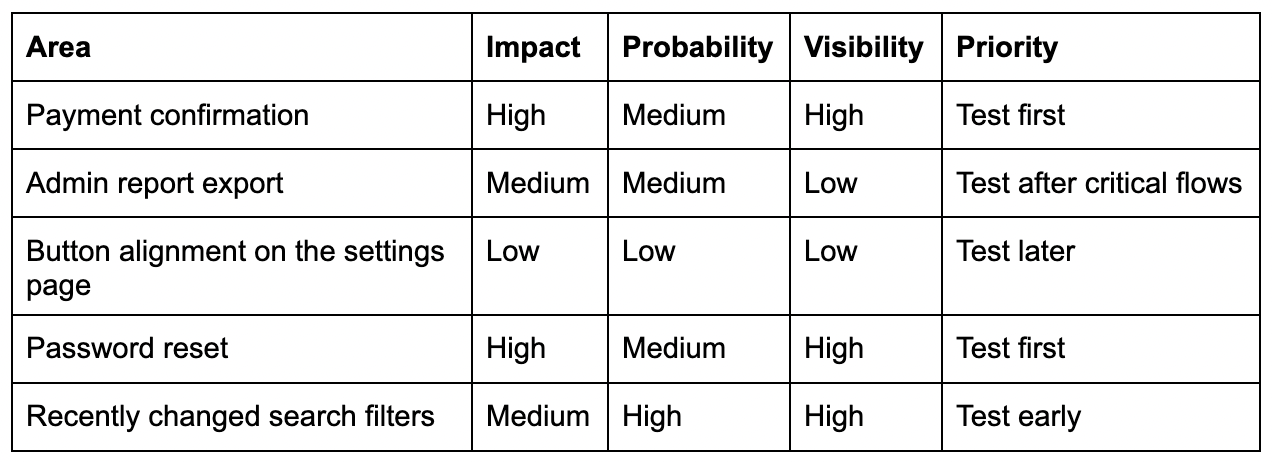
Risk-based testing does not need to be complicated. You can start with a simple scoring model.
For each feature, flow, or test case, estimate:
Impact: What happens if it fails? Probability: How likely is it to fail? Visibility: How many users will notice it? Change level: Was it recently changed? Business importance: Does it affect money, data, compliance, or core workflows?
You can score each factor from 1 to 3:
1 = low 2 = medium 3 = high
Then use the result to decide what to test first.
For example:
This does not need to be a heavy process. Even a simple risk discussion before test execution can improve QA focus.
A practical release prioritization checklist
Before starting test execution, QA can ask these questions:
User impact
Which flows are most important for users?
Which defects would block users completely?
Which areas are used most often?
Business impact
What affects payment, revenue, conversion, or operations?
What affects client trust?
What affects reporting or decision-making?
Data risk
Where can data be lost, duplicated, overwritten, or shown incorrectly?
Where can users access data they should not see?
Technical risk
What changed recently?
What depends on third-party services?
What areas have unstable integrations?
What areas had repeated bugs before?
Release confidence
What must be in place before we can recommend release?
What can be tested later without serious risk?
What should be included in smoke, regression, and deep testing?
These questions help QA move from “we have many test cases” to “we know what matters most.”
What to test first when time is very limited
Sometimes QA has very little time before release. In that case, prioritize in this order:
First, test the flows that block users from using the product. It includes login, registration, onboarding, access to key features, and critical navigation.
Second, test flows that affect money, data, or permissions. It includes payments, subscriptions, billing, personal data, access roles, and anything related to security or privacy.
Third, test recently changed functionality and the areas around it. Most regression risk comes from change, not from untouched parts of the product.
Fourth, test integrations that support key flows. If an integration fails silently, the user may not see the problem immediately, but the business may still lose leads, payments, notifications, reports, or records.
Fifth, test the most-used paths. If many users depend on a flow, even a small bug can create a large support issue.
This structure gives QA a realistic plan when full coverage is not possible.
Common mistakes in risk-based testing
Risk-based testing is simple in theory, but teams often make mistakes when applying it.
Mistake 1: Prioritizing based only on developer comments
Developers know the technical change, but QA should also consider user impact, business rules, permissions, data, and integrations.
Developer input is valuable, but it should not be the only source of risk assessment.
Mistake 2: Treating all regression tests equally
Regression suites often grow over time. Without prioritization, teams may spend too much time executing old, low-value cases.
Regression tests should be reviewed and grouped by priority.
Mistake 3: Ignoring production data
Analytics, support tickets, customer complaints, and escaped defects are strong signals. They show where real users experience problems.
Risk-based testing should learn from production reality.
Mistake 4: Forgetting to update priorities
Risk changes. A low-risk feature can become high-risk after a major redesign, a new integration, a pricing change, or a customer complaint.
Test priorities should be reviewed regularly, especially before important releases.
Mistake 5: Confusing “urgent” with “important”
A request may feel urgent because someone asked loudly. But QA should still check whether it is truly high risk.
Good prioritization protects the product, not just the schedule.
How TestCaseLab supports risk-based testing
Risk-based testing works better when priorities are visible. If test cases are scattered across spreadsheets, documents, chats, or personal notes, it becomes harder to understand what should be tested first and why.
TestCaseLab helps QA teams keep test cases structured and easier to manage.
A practical risk-based workflow can look like this:
1. Organize test cases by feature or module This helps the team quickly find relevant coverage for each product area.
2. Mark priority clearly High-risk cases should be easy to identify before execution starts.
3. Build test runs around release risk Instead of running everything randomly, QA can create test runs for smoke testing, critical regression, changed areas, and full regression.
4. Keep execution history visible Past results help the team understand which areas fail repeatedly and deserve more attention.
5. Update cases after real defects When a bug is missed, add or improve the test case so the same risk is covered next time.
This turns risk-based testing from a one-time discussion into a repeatable QA practice.
Final thoughts
In 2026, QA teams do not need more random testing. They need better focus.
Fast releases, connected systems, AI-assisted workflows, and limited QA time make prioritization essential. Risk-based testing helps teams decide what deserves attention first, what can wait, and where testing will create the most release confidence.
The goal is not to test less. The goal is to test where failure would matter most.
Start with what can hurt the user, the business, the data, or the release's confidence. Then organize that work clearly, execute it intentionally, and keep improving your test suite after every release.
Strong QA is not measured only by how many test cases were executed. It is measured by how well the team understood the risk.