In 2026, one of the most expensive habits in QA is still alive: massive regression suites that nobody fully trusts, nobody fully reads, and nobody can run fast enough.
What used to be a sign of maturity is now a bottleneck.
500-step test scenarios.
Monolithic test plans.
End-to-end flows that break with every small change.
Meanwhile, development has changed completely.
AI is generating features in minutes.
Releases happen continuously.
Logic evolves faster than documentation.
And yet many QA teams are still trying to validate this speed with structures designed for a slower era. This mismatch is where quality starts to fail.
The Problem with Traditional Regression Thinking
Regression suites were built around one core idea: If we test everything together, we reduce risk. That assumption no longer holds.
In AI-driven development, regression suites introduce three critical issues:
1. They are too slow to execute
By the time a full suite runs, the system may already have changed
2. They are too rigid to adapt
Small updates require rewriting large portions of tests
3. They hide real risk
When everything is tested together, it becomes harder to isolate what actually failed
Most importantly, they assume stability. And in 2026, stability is no longer the default state of software.
From Regression to Atomic Validation
Modern QA teams are shifting toward a different principle: Validate small, independent units of logic that can be reused, combined, and executed instantly.
This approach is called Atomic Validation.
Instead of building large end-to-end scenarios, teams create modular test units that focus on:
One behavior
One rule
One expectation
These units can then be:
Reused across multiple features
Combined dynamically into test runs
Executed selectively based on risk
This is how QA keeps up with continuous delivery.
What “Atomic” Actually Means in Practice
Atomic testing is not about writing smaller tests just for the sake of it. It is about changing how you think about validation.
An atomic test case should:
✔️ Validate a single piece of logic
✔️ Have a clear expected outcome
✔️ Be independent from other tests
✔️ Be reusable across contexts
Example
Instead of: “Verify full checkout flow with discount, login, payment, and confirmation”
You break it into:
Discount calculation logic
Login session validation
Payment processing outcome
Order confirmation rules
Each piece becomes testable, reusable, and easier to debug.
Why Atomic Validation Works in 2026
This approach aligns with how modern systems behave:
AI-generated code is modular by nature
It builds components, not monoliths
Bugs are more contextual
They often live in specific logic blocks, not full flows
Speed requires selectivity
You cannot test everything every time
Atomic validation allows QA teams to:
Test only what changed
React instantly to updates
Reduce noise in bug detection
The Hidden Benefit: Faster Root Cause Analysis
One of the biggest advantages of atomic testing is clarity.
When a large regression test fails, teams ask:
“What broke?”
When an atomic test fails, teams know:
“This specific rule is broken.”
That difference can save hours, or even days, of debugging time.
How to Transition from Legacy Suites to Atomic QA
Moving away from regression-heavy structures does not require rebuilding everything from scratch.
It requires systematic decomposition.
Step 1: Identify Core Logic Blocks
Break down large test cases into smaller validation points
Step 2: Remove Redundancy
Eliminate repeated steps across test cases
Step 3: Isolate Dependencies
Ensure each test can run independently
Step 4: Define Clear Outcomes
Each test should answer one question only
This process turns heavy suites into flexible systems.
Structuring Atomic QA in TestCaseLab
To make Atomic Validation scalable, structure matters.
Platforms like TestCaseLab enable teams to organize testing in a modular way.
Here is how modern QA teams structure their work:
1. Test Suites by Feature or “Vibe”
Instead of one large regression suite, organize tests by feature modules
This allows:
Faster navigation
Targeted execution
Better ownership across teams
2. Reusable Test Plans
Create collections of atomic tests that can be reused across releases
Instead of rebuilding test runs:
Select relevant modules
Combine them instantly
Execute based on current risk
3. Requirement Linking
Every test case is connected to a requirement
This ensures:
Full coverage visibility
Easier impact analysis
Better alignment between intent and validation
Common Mistakes When Going Atomic
Many teams attempt this shift but fall into new traps:
Making tests too granular
Atomic does not mean meaningless micro-steps
Losing business context
Even small tests must reflect real user impact
Overcomplicating structure
The goal is flexibility, not bureaucracy
Atomic QA should simplify, not fragment.
The Future of QA Is Selective, Not Exhaustive
The biggest mindset shift in 2026 is this:
Quality is no longer about testing everything. It is about testing the right things at the right time.
Atomic Validation enables this by giving QA teams control over:
What to test
When to test
Why it matters
Final Thought: Quality Is a Pulse, Not a Phase
In fast-moving environments, quality cannot be a final checkpoint. It must be continuous, adaptive, and lightweight. Atomic QA reflects this reality.
It replaces rigid structures with flexible systems. It replaces volume with precision. It replaces delay with responsiveness.
And most importantly, it allows QA teams to stay relevant in a world where software is no longer built step by step, but generated, refined, and deployed in a continuous loop.
If your current regression suite feels heavy, slow, or outdated, that is not a tooling issue. It is a signal.
A signal that it is time to stop thinking in terms of “big test coverage” and start thinking in atomic validation units that move as fast as your product does.
There is one change in QA work that is easy to miss at first. Testing itself did not necessarily become more difficult, but deciding whether something is ready for release definitely did.
AI changed the speed of development. Features can be drafted faster, code can be generated faster, test ideas can appear in seconds, and teams can move from requirement to implementation much quicker than before.
At first, that sounds like a clear win. And in many cases, it is. But faster delivery also creates a different kind of pressure for QA teams.
When code is generated quickly and looks correct on the surface, it becomes harder to say with confidence that everything important has actually been covered. A feature can work. Tests can pass. The main flow can look stable. And still, there may be uncertainty around hidden assumptions, missed edge cases, unclear business logic, or security-sensitive behavior.
That uncertainty is where a lot of release tension comes from now.
AI helps teams move faster, but trust is still limited
AI is already part of everyday development work for many teams. GitHub describes AI, agents, and typed languages as driving one of the biggest shifts in software development in more than a decade.
At the same time, developers are not blindly trusting AI output. Stack Overflow’s 2025 Developer Survey found that 52% of developers say AI tools or agents have had a positive effect on productivity, but trust remains a major issue: more developers actively distrust AI tool accuracy than trust it, and only a small fraction report high trust.
That gap between productivity and trust is exactly where QA lives.
AI may help create faster output, but someone still needs to decide whether that output is reliable enough for real users.
Why “tests pass” is no longer enough
For a long time, passing tests gave teams a basic level of comfort. It did not mean the product was perfect, but it was a useful signal: the expected behavior was checked, the main flows worked, and the release had some measurable validation behind it.
With AI-generated or AI-assisted code, this signal becomes more complicated.
The feature may pass tests because the tests only cover what everyone already expected. But AI-generated logic can still fail in scenarios that were not clearly described, not included in the prompt, or not visible from the requirement.
For example, a generated subscription upgrade flow may correctly handle the happy path, but miss what happens when:
the user changes plan in the middle of a billing cycle;
the payment method fails after the upgrade is requested;
the user has a discount applied;
the account is part of a team subscription;
the user tries to downgrade immediately after upgrading.
From a basic functional perspective, the feature may look ready. From a QA perspective, there are still open questions.
That is the difference between checking functionality and evaluating release confidence.
The new release question: “Do we understand the risk?”
The question QA teams need to answer is changing. It is no longer only:
“Did we test this?”
It is becoming:
“Do we understand the risk well enough to release this?”
That is a much harder question.
It requires QA to look beyond pass/fail results and think about how the feature behaves in real conditions. This includes unclear inputs, unusual user behavior, incomplete data, permission changes, integration failures, timing issues, and security-sensitive cases.
This matters even more when AI is involved because generated code can look clean and confident while still missing product-specific context.
A developer may review the code and see that it compiles. QA may test the main scenario and see that it works. Product may check the expected user flow and approve it.
But no one may have questioned the hidden assumption behind the logic.
That is often where production bugs begin.
Security adds another layer of uncertainty
AI-generated code also brings security concerns into everyday QA conversations.
Research from Stanford found that participants with access to an AI coding assistant wrote significantly less secure code than those without access, while also being more likely to believe their code was secure.
OpenSSF has also warned that AI-generated code can contain security vulnerabilities and should not be accepted without review, especially because functional correctness and secure implementation are not the same thing.
For QA teams, this does not mean every tester suddenly becomes a security engineer. But it does mean standard functional testing is not enough for AI-assisted development.
QA should be more attentive to cases such as:
missing input validation;
unsafe permission handling;
weak error handling;
insecure default behavior;
exposed sensitive data;
business rules that can be bypassed.
These issues may not be visible in a normal “does it work?” test. They require risk-based thinking.
What changes in day-to-day QA work
The biggest change is not that QA needs to test more randomly or add endless edge cases.
The real change is that QA needs a clearer way to decide what matters.
When teams use AI, the amount of generated material can grow quickly: code, test cases, acceptance criteria drafts, automation snippets, user stories, and documentation. Without structure, this can create noise instead of clarity.
Day-to-day QA work starts to include more of the following:
reviewing generated test cases instead of simply accepting them;
checking whether the test suite covers real user flows, not only isolated actions;
challenging scenarios that look “complete” but are too shallow;
adding negative and misuse cases earlier;
connecting test coverage to release risk.
This is why test management becomes more important, not less.
If test cases are scattered, duplicated, outdated, or disconnected from test runs, it becomes very difficult to understand what has actually been covered. And when AI increases the speed of output, poor structure becomes visible much faster.
How QA can improve release confidence
A practical QA approach for AI-assisted development should focus on confidence, not only coverage.
Here are a few useful questions to ask before release:
1. Are we testing only the expected path, or also the fragile paths? Happy paths are important, but they are not enough. Look at boundary conditions, failed actions, repeated actions, permission changes, and unusual sequences.
2. Do we understand the assumptions behind the logic? If a feature behaves correctly, ask why. What rule is it following? What data does it depend on? What happens when that data changes?
3. Are AI-generated test cases reviewed by someone who understands the product? Generated tests can be useful as a draft, but they should not become the final test suite without review.
4. Do our test runs show what was actually validated? A list of test cases is not the same as release visibility. The team needs to see what was executed, what failed, what was skipped, and where the remaining risk is.
5. Can we explain why we believe this is ready? If the answer is only “all tests passed,” the team may need a deeper release discussion.
Where structured test management helps
AI can generate a lot of material quickly. But QA still needs structure to turn that material into something reliable. This is where TestCaseLab can help.
TestCaseLab supports structured test management by helping QA teams organize test cases, group them into clear suites, prepare test runs, track execution results, and keep visibility over what has been tested and what still needs attention.
That structure matters even more when teams work with AI-generated code or AI-generated test ideas. Without it, the team may have more output, but less clarity. With it, QA can better connect test cases, coverage, execution, and release confidence.
In other words, AI may speed up the work, but structured test management helps keep that work under control.
Final thought
The hardest part of QA today is not always finding bugs. Sometimes the hardest part is deciding whether the team knows enough to release safely.
AI makes this question more important because it increases speed, volume, and complexity. It can help teams move faster, but it also makes it easier to miss what was never clearly questioned.
That is why QA is becoming less about simply confirming that something works and more about evaluating whether the team can trust it.
AI is becoming part of the software testing life cycle, but it does not replace the structure that makes testing reliable.
The 2026 State of Testing report found that 76.8% of respondents use AI in testing. The question for many teams has therefore changed. They are no longer deciding whether AI belongs in QA. They are deciding where it should be used and where human review remains essential.
A useful AI-powered STLC gives AI a clear role at each stage.
1. Requirement analysis
AI can summarise specifications, meeting notes, tickets and attached documents.
It can also suggest:
possible acceptance criteria;
unclear terms;
missing conditions;
user roles;
business rules;
potential test areas.
The QA team should verify every suggestion against the actual product context.
An AI assistant does not know which stakeholder statement is authoritative unless the team provides that context. It may also fill gaps with a reasonable-sounding assumption.
The output should therefore support requirement review rather than become the requirement automatically.
2. Test planning
AI can help create an initial list of risks, affected modules and test types.
The QA lead still decides:
what is in scope;
what carries the highest business risk;
which environments are required;
who owns each test activity;
how much regression is appropriate;
what evidence is needed before release.
Planning requires knowledge of deadlines, team capacity and product priorities. These decisions cannot be made from the feature description alone.
3. Test design
Test case generation is one of the most common uses of AI in testing.
It is useful for creating a starting point, especially when the input includes clear requirements, business rules and examples.
Generated test cases should pass through a review step before they enter the permanent repository.
Testers need to check:
product accuracy;
duplicated coverage;
preconditions;
clarity of steps;
expected results;
negative scenarios;
edge cases;
test data requirements.
TestCaseLab allows users to generate test cases and requirements, review the preview, edit the content and save the approved version.
This keeps the tester in control of the final output.
4. Test execution
AI can support execution by suggesting relevant test cases, analysing logs or identifying patterns in failures.
Manual testing remains important when the application behaves in an unexpected way.
A tester may notice:
confusing feedback;
inconsistent behaviour;
unusual timing;
broken transitions;
hidden dependencies;
a result that technically passes but feels wrong to a user.
These observations often come from curiosity and product knowledge rather than a predefined script.
5. Defect investigation
AI can help organise technical information from logs, error messages and test results.
It may suggest a likely cause or identify similar failures.
The tester and developer still need to verify the diagnosis.
A confident explanation from an AI tool can be incorrect, especially when the available logs are incomplete or several systems are involved.
The team should record confirmed evidence separately from generated suggestions.
6. Reporting
AI can prepare summaries of:
completed testing;
failed cases;
unresolved defects;
coverage;
blockers;
release risks.
This can reduce the time spent formatting reports.
QA leads should review the final message carefully. A summary may omit an important exception or present several failures as one general issue.
Reporting is also communication. The reader needs to understand what was tested, what remains uncertain and what decision is required.
7. Test maintenance
AI can help identify similar test cases, outdated wording or scenarios affected by a requirement change.
The team still needs rules for deciding what should be updated, merged or removed.
Without maintenance, AI can increase the size of a repository much faster than its value.
Each saved test should have a clear purpose and remain useful for future execution.
A simple operating principle
A practical AI-powered STLC follows one rule:
AI prepares and assists. QA reviews and decides.
This division keeps the process efficient without losing accountability.
TestCaseLab supports structured QA workflows through test case management, AI-assisted generation, test runs, milestones, reporting and collaboration.
The goal is to help teams spend less time preparing repetitive material and more time understanding product risk.
A practical guide for QA teams that have too many test cases, limited time, and releases that cannot wait.
When everything feels important, QA needs prioritization. Modern software teams release faster, systems are more connected, and product changes move through pipelines more frequently than before. At the same time, QA time is still limited. Testers rarely have the perfect amount of time, documentation, test data, or stable environments.
So the real question is not:
“What can we test?”
It is:
“What should we test first?”
That is where risk-based testing becomes one of the most useful QA approaches in 2026.
ISTQB defines risk-based testing as a testing approach in which test activities are selected, prioritized, and managed based on risk analysis and risk control. In simple words, it means QA effort should go first to the areas where failure would hurt the most.
Risk-based testing is not about testing less.
It is about testing smarter.
Why risk-based testing matters more in 2026
Software products are rarely simple now. A single user action can involve the frontend, backend, database, API, payment provider, CRM, analytics tool, notification service, authentication provider, and third-party integration. One small change can affect several parts of the product.
At the same time, QA teams are expected to support faster delivery, continuous testing, automation, AI-assisted test generation, and more frequent releases. Current software testing best-practice discussions for 2026 highlight risk-based testing, automation, metrics, and AI as key areas for building more robust QA processes.
This creates a familiar situation:
The team has many things to test, but not enough time to test everything in depth.
If QA treats every test case as equally important, the team can spend too much time on low-risk areas and not enough time on the flows that could block users, cause financial loss, corrupt data, or damage trust.
Risk-based testing helps QA answer a better question:
Where would a defect create the biggest problem?
That answer should guide test planning.
The problem with “test everything equally”
Testing everything with the same priority sounds safe, but it often creates false confidence.
For example, a QA team may execute 120 low-risk UI checks and still miss one critical issue in billing logic. The test report may look good because many test cases passed, but the product may still be risky.
This is one of the biggest traps in QA management: A high number of passed test cases does not always mean strong release confidence.
Some tests protect the product more than others. A typo on a secondary settings page is not equal to a failed payment confirmation.
A small alignment issue is not equal to incorrect user permissions.
A missing placeholder text is not equal to exposing another customer’s data.
Risk-based testing helps teams avoid this problem by looking at impact, probability, and business importance before deciding what to test first.
What “risk” means in QA
In QA, risk usually combines two questions:
How bad would it be if this failed? This is the impact. How likely is it to fail? This is the probability.
A high-risk area is usually something with high impact, high probability, or both.
For example, payment processing is high impact because failure can directly affect revenue and customer trust. Recently changed code may be high probability because new changes are more likely to introduce defects. A third-party integration may be risky because your team does not fully control its behavior.
Risk does not always mean “the most complex feature.” Sometimes the riskiest area is the one customers use every day.
Sometimes it is the area with repeated bugs.
Sometimes it is the part nobody wants to touch because the logic is old, fragile, or poorly documented.
A tester’s job is to notice these signals and turn them into a practical test priority.
Areas QA teams should usually test first
Every product is different, but some areas commonly deserve high priority.
Payment and billing flows
Payment issues are rarely minor. If users cannot pay, are charged incorrectly, receive the wrong invoice, or do not get access after payment, the business impact is immediate.
For payment and billing, QA should prioritize:
successful payment;
failed payment;
payment timeout;
duplicate payment attempt;
discount or promo code logic;
tax calculation;
subscription renewal;
subscription cancellation;
refund flow;
invoice generation;
access after payment.
A payment flow should not be tested only from the UI side. It is also important to check what happens in the payment provider, backend, email notification, subscription status, and admin view.
Login, authentication, and access permissions
Access issues can affect security, privacy, and trust. A login bug may block users from the product. A permission bug may expose data or allow users to perform actions they should not be able to perform.
QA should prioritize:
log in with valid and invalid credentials;
password reset;
session expiration;
multi-factor authentication, where applicable;
role-based access;
organization-level access;
admin permissions;
read-only permissions;
deleted or disabled users;
cross-account data access.
Access control should always be tested with multiple roles. A feature that works correctly for an admin may behave incorrectly for a regular user, a manager, a guest, or a user from another organization.
Data loss or incorrect data
Some bugs do not crash the system. They quietly damage data. That can be much worse.
Examples include:
saved changes disappearing;
incorrect totals;
duplicated records;
broken data sync;
wrong status after an action;
outdated information shown to users;
incorrect report values;
data overwritten by another user.
These issues can be hard to detect because the interface may still look fine.
Risk-based testing should give high priority to flows where users create, update, delete, import, export, or sync important data.
A useful question is:
Would the user or business make a bad decision if this data were wrong? - If so, test it early.
Integrations with third-party systems
Modern products depend heavily on integrations. A feature may look successful in the UI, but fail behind the scenes because the CRM, payment provider, email service, analytics platform, chatbot, map service, or external API did not receive or return the correct data.
Prioritize integration testing when the feature depends on:
payment gateways;
email or SMS services;
CRM systems;
analytics platforms;
authentication providers;
file storage;
maps or location services;
booking systems;
accounting tools;
external APIs.
The UI is only one part of the flow. QA should also check whether the correct data is sent, received, saved, displayed, and handled when the integration fails.
Recently changed functionality
Change creates risk.
Even a small update can affect existing behavior, especially if the product has shared components, reused logic, or connected workflows.
Recently changed areas should usually be tested before stable areas.
QA should ask:
What changed in this release?
What existing behavior depends on this change?
What could break around it?
What bugs were fixed?
What should be retested because of the fix?
Are there related regression cases?
AI-driven tools and modern automation can help prioritize tests based on code changes and historical defect patterns, but the team still needs a clear risk model and human review of what matters for the release.
A good rule: Do not test only the new feature. Test the area around the change.
Features used by most customers
A low-complexity feature can still be high risk if many users depend on it.
For example, search, login, checkout, dashboard loading, notifications, or profile editing may not always be technically complex, but if most users use them, defects become visible quickly.
QA should prioritize high-usage flows because they affect more customers and generate more support pressure when broken.
Useful signals include:
analytics data;
customer support tickets;
user behavior reports;
product team input;
frequently used workflows;
core business journeys.
A rarely used advanced setting may wait. A broken daily workflow usually cannot.
Areas with repeated defects
Past defects are one of the best risk indicators. If the same module has broken several times before, it deserves attention.
Repeated defects may indicate:
unclear requirements;
fragile code;
weak test coverage;
complex business rules;
poor ownership;
dependency issues;
technical debt;
unstable integrations.
Risk-based testing should use defect history, not only current requirements.
A simple QA habit helps: After each release, look at escaped bugs and recurring defects. Then update the regression suite based on what actually caused problems.
This turns real project experience into better coverage in the future.
How to prioritize test cases in practice
Risk-based testing does not need to be complicated. You can start with a simple scoring model.
For each feature, flow, or test case, estimate:
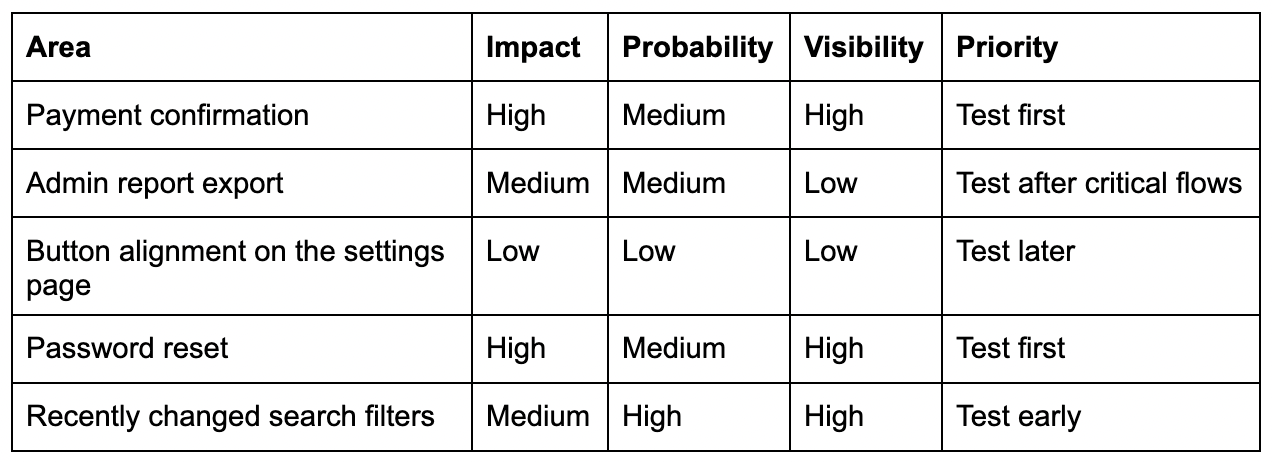
Impact: What happens if it fails? Probability: How likely is it to fail? Visibility: How many users will notice it? Change level: Was it recently changed? Business importance: Does it affect money, data, compliance, or core workflows?
You can score each factor from 1 to 3:
1 = low 2 = medium 3 = high
Then use the result to decide what to test first.
For example:
This does not need to be a heavy process. Even a simple risk discussion before test execution can improve QA focus.
A practical release prioritization checklist
Before starting test execution, QA can ask these questions:
User impact
Which flows are most important for users?
Which defects would block users completely?
Which areas are used most often?
Business impact
What affects payment, revenue, conversion, or operations?
What affects client trust?
What affects reporting or decision-making?
Data risk
Where can data be lost, duplicated, overwritten, or shown incorrectly?
Where can users access data they should not see?
Technical risk
What changed recently?
What depends on third-party services?
What areas have unstable integrations?
What areas had repeated bugs before?
Release confidence
What must be in place before we can recommend release?
What can be tested later without serious risk?
What should be included in smoke, regression, and deep testing?
These questions help QA move from “we have many test cases” to “we know what matters most.”
What to test first when time is very limited
Sometimes QA has very little time before release. In that case, prioritize in this order:
First, test the flows that block users from using the product. It includes login, registration, onboarding, access to key features, and critical navigation.
Second, test flows that affect money, data, or permissions. It includes payments, subscriptions, billing, personal data, access roles, and anything related to security or privacy.
Third, test recently changed functionality and the areas around it. Most regression risk comes from change, not from untouched parts of the product.
Fourth, test integrations that support key flows. If an integration fails silently, the user may not see the problem immediately, but the business may still lose leads, payments, notifications, reports, or records.
Fifth, test the most-used paths. If many users depend on a flow, even a small bug can create a large support issue.
This structure gives QA a realistic plan when full coverage is not possible.
Common mistakes in risk-based testing
Risk-based testing is simple in theory, but teams often make mistakes when applying it.
Mistake 1: Prioritizing based only on developer comments
Developers know the technical change, but QA should also consider user impact, business rules, permissions, data, and integrations.
Developer input is valuable, but it should not be the only source of risk assessment.
Mistake 2: Treating all regression tests equally
Regression suites often grow over time. Without prioritization, teams may spend too much time executing old, low-value cases.
Regression tests should be reviewed and grouped by priority.
Mistake 3: Ignoring production data
Analytics, support tickets, customer complaints, and escaped defects are strong signals. They show where real users experience problems.
Risk-based testing should learn from production reality.
Mistake 4: Forgetting to update priorities
Risk changes. A low-risk feature can become high-risk after a major redesign, a new integration, a pricing change, or a customer complaint.
Test priorities should be reviewed regularly, especially before important releases.
Mistake 5: Confusing “urgent” with “important”
A request may feel urgent because someone asked loudly. But QA should still check whether it is truly high risk.
Good prioritization protects the product, not just the schedule.
How TestCaseLab supports risk-based testing
Risk-based testing works better when priorities are visible. If test cases are scattered across spreadsheets, documents, chats, or personal notes, it becomes harder to understand what should be tested first and why.
TestCaseLab helps QA teams keep test cases structured and easier to manage.
A practical risk-based workflow can look like this:
1. Organize test cases by feature or module This helps the team quickly find relevant coverage for each product area.
2. Mark priority clearly High-risk cases should be easy to identify before execution starts.
3. Build test runs around release risk Instead of running everything randomly, QA can create test runs for smoke testing, critical regression, changed areas, and full regression.
4. Keep execution history visible Past results help the team understand which areas fail repeatedly and deserve more attention.
5. Update cases after real defects When a bug is missed, add or improve the test case so the same risk is covered next time.
This turns risk-based testing from a one-time discussion into a repeatable QA practice.
Final thoughts
In 2026, QA teams do not need more random testing. They need better focus.
Fast releases, connected systems, AI-assisted workflows, and limited QA time make prioritization essential. Risk-based testing helps teams decide what deserves attention first, what can wait, and where testing will create the most release confidence.
The goal is not to test less. The goal is to test where failure would matter most.
Start with what can hurt the user, the business, the data, or the release's confidence. Then organize that work clearly, execute it intentionally, and keep improving your test suite after every release.
Strong QA is not measured only by how many test cases were executed. It is measured by how well the team understood the risk.
For a long time, QA teams were often asked one main question before release: “Did you test it?”
The expected answer was usually simple: “Yes, we tested it.”
But modern software delivery has changed. That answer is no longer enough.
Today, teams need to know what exactly was tested, which areas were covered, what failed, what passed, what was skipped, what changed during the release cycle, and what risk remains.
This is the shift from test execution to quality evidence. Test execution shows that testing happened.
Quality evidence helps the team make a decision.
Why “we tested it” is no longer enough
Software products are more complex than they used to be. A single user action can involve the frontend, backend, database, third-party services, payment providers, email systems, analytics tools, permissions, notifications, and mobile responsiveness.
A small change can affect several connected flows.
A redesign can make old test cases outdated.
An API update can break functionality that looks unrelated.
AI-assisted development can speed up code creation, but QA teams still need to validate that the product works correctly for real users.
That is why QA results need context. When a team says “we tested it,” stakeholders may still need to ask:
What exactly was tested?
Which version was tested?
Which environments were used?
Which critical flows were covered?
Which test cases failed?
Which bugs are still open?
Which areas were skipped because of time?
What is the remaining release risk?
Without answers to these questions, the testing activity does not fully support confidence in the release.
Execution is an activity. Evidence is decision support.
Test execution is necessary. QA teams need to run tests, check features, verify fixes, explore risks, and report defects.
But execution alone is not the full value of QA.
The real value appears when testing results help the team make better decisions. Quality evidence helps answer questions like:
Is this release ready?
What is the biggest known risk?
Which areas need retesting?
Can we release with this defect?
Do we need more time?
Which feature is unstable?
What should be prioritized next?
This is especially important for QA leads, product managers, project managers, developers, and stakeholders who need a clear picture of quality before release.
What QA teams need to prove in 2026
QA teams do not need to prove that they tested everything. That is not realistic.
They need to prove that testing was thoughtful, structured, and connected to product risk.
A strong QA process should make several things visible.
First, it should show scope. The team needs to know which features, flows, user roles, devices, browsers, or integrations were included in testing.
Second, it should show priority. Not all tests have the same importance. Critical user journeys, revenue-related flows, security-sensitive areas, and recently changed features usually require more attention.
Third, it should show execution results. Passed, failed, blocked, and skipped tests all tell a different story. A release with many skipped critical tests is not the same as a release with skipped low-priority checks.
Fourth, it should show defects and retesting status. It is not enough to find bugs. Teams need to know whether fixes were verified and whether regression risk was checked.
Fifth, it should show the remaining risk. No release is completely risk-free. Good QA work helps the team understand which risks are acceptable and which ones need action.
Why scattered QA evidence creates problems
Many teams still keep QA evidence across multiple places:
test cases in spreadsheets;
bug details in a tracker;
screenshots in chats;
release notes in documents;
testing updates in Slack;
final status in a meeting;
context in someone’s memory.
This may work for small teams for a while. But as the product grows, this becomes harder to manage.
The team may lose track of what was tested. Test cases may become outdated. Test results may be hard to find. QA reports may require manual work every time. New team members may struggle to understand previous testing decisions.
The problem is that testing is not visible enough.
Good test management makes QA evidence easier to trust
A structured test management process helps QA teams keep testing work clear and reusable.
When test cases are organized, test runs are created for specific releases or milestones, and results are tracked consistently, the team gets a much better picture of quality.
This helps QA teams answer practical questions:
What should we test for this release?
Which tests are assigned?
Which tests are completed?
What failed?
What still needs attention?
What was covered in the last regression run?
Which test cases need updates?
What can we show to stakeholders?
This is not only useful for QA.
It helps the whole product team work with better information.
Quality evidence matters more when teams move fast
Fast delivery creates pressure. Teams want to release quickly. Product teams want progress. Developers want feedback. Stakeholders want updates. Users expect stability.
In this environment, QA teams need to avoid two extremes.
The first extreme is testing everything equally. This is usually impossible and inefficient.
The second extreme is testing only what is obvious. This creates risk because important connected flows may be missed.
Quality evidence helps teams stay balanced.
It shows what was tested, why those areas mattered, and what the results mean for the release.
How TestCaseLab supports quality evidence
TestCaseLab helps QA teams organize test cases, test suites, test runs, milestones, and reports within a single structured workflow.
Instead of keeping testing activity scattered across documents and chats, teams can manage test cases, execute runs, track progress, and keep results visible.
This helps QA teams move from “we tested it” to a clearer message: “We tested these areas, these scenarios passed, these issues were found, these fixes were verified, and this is the remaining risk.”
That kind of visibility supports better release decisions.
QA is becoming more evidence-driven
The role of QA is not only to find bugs. QA teams help protect user experience, product stability, business logic, and release confidence.
In 2026, this means QA needs to provide more than execution. It needs to provide evidence that the team can trust.
Not perfect evidence.
Not endless documentation.
Not unnecessary bureaucracy.
Just enough structure to make quality visible. Because the most useful QA work is not only the testing that happens.
It is the testing that the team can understand, discuss, and use to make better decisions.
QA reports often focus on two statuses: Passed and Failed.
Passed means the tested behavior worked as expected. Failed means something did not meet the expected result and needs attention.
But there is another status that deserves more respect in QA reporting: Not Tested.
At first glance, it may look neutral. Nothing passed. Nothing failed. Nothing happened.
But in real release planning, “Not Tested” is not empty information. It tells the team that there is no testing evidence for that area yet. And that matters.
“Not Tested” means the team lacks evidence
When a test case remains Not Tested, it does not automatically mean there is a problem with the product.
It may simply mean the team did not have enough time. The scenario may have been out of scope for the current release. The environment may not have been ready. The required test data may have been missing. Another issue may have blocked the feature.
All of these are valid reasons, but the status should still be visible.
The risk starts when Not Tested cases are ignored, hidden, or treated as if they do not matter. In that situation, the team may believe the release is covered better than it actually is.
A release report with 90 passed tests can look strong, but if 40 important tests were not executed, the picture is incomplete.
QA reporting should not only answer: “What passed?”, “What failed?”
It should also answer: “Where do we still lack evidence?”
Why Not Tested cases matter before release
Every release decision is made with some level of uncertainty. QA does not remove all risk, but it helps the team understand it. That is why Not Tested cases are important. They show where the team cannot confidently say, “This was checked.”
For example, imagine a release where the main happy path passed, but several permission-related tests were not executed. The report may still look mostly green, but the team lacks evidence that users with different roles can access only what they should.
Or imagine that payment tests passed in one region, but localization and currency-related cases were not tested. The release may work for one group of users but fail for another.
The product may still be released. Sometimes that is the right business decision. But it should be an informed decision.
There is a big difference between:
“We tested this, and it passed.”
and
“We did not test this, but we understand the risk and accept it.”
Not Tested is not the same as low priority
One common mistake is treating Not Tested cases as automatically unimportant. That is not always true.
A test case can remain Not Tested because it was low priority. Still, it can also remain Not Tested because QA ran out of time, the environment was unstable, requirements changed late, or a blocker prevented execution.
This is why QA teams should not only count Not Tested cases. They should understand why they were not executed.
The reason behind the status matters. If a low-risk visual check was not tested, the impact on the release may be small. If a critical checkout flow, permission rule, data migration, or security-related scenario was not tested, the situation is different.
Not Tested cases should be reviewed with context, not ignored.
How QA teams should work with Not Tested status
A useful QA process makes missing evidence visible.
Before release, QA leads and project teams should review Not Tested cases and ask what they mean for the current release.
The review does not need to be complicated. The team can focus on three questions:
Why was this test not executed? Was it out of scope, blocked, skipped because of time, or waiting for another dependency?
What is the risk if this area remains untested? Could it affect users, revenue, security, compliance, or a critical business flow?
What should happen next? Should the test be executed before release, moved to a later milestone, marked as blocked, or accepted as a known risk?
This simple review helps teams avoid false confidence.
It also makes communication clearer. Instead of saying, “Most tests passed,” QA can say, “These areas passed, these failed, these were blocked, and these were not tested, with the following risk level.”
That is a much better foundation for release decisions.
Why visibility matters in test management
When test results are scattered across spreadsheets, chat messages, tickets, and personal notes, Not Tested cases can disappear easily. This creates a reporting problem.
The team may remember defects because they are visible. Passed tests may be counted because they look positive. But Not Tested cases may receive less attention because they do not create an immediate alert.
A structured test management process helps prevent this. When test cases are organized into test runs, and each case has a clear status, QA teams can see the full picture:
🔸 Passed shows confirmed behavior.
🔸 Failed shows discovered problems.
🔸 Blocked shows where execution could not continue.
🔸 Not Tested shows where evidence is still missing.
All four statuses are useful. Together, they give the team a more honest view of release readiness.
Where TestCaseLab fits in
TestCaseLab helps QA teams keep test execution visible and organized.
Teams can create test cases, group them into suites, plan test runs, track results, and review statuses such as Passed, Failed, Blocked, and Not Tested.
This helps QA leads and teams understand not only what was checked, but also what still needs attention.
For manual testing teams, this visibility is especially important. Manual QA often deals with changing priorities, limited time, unstable environments, and last-minute release decisions. Without clear statuses, it becomes easy to lose track of what was actually tested.
With structured test runs and reporting, Not Tested cases do not disappear.
Why rerunning one failed test may hide a much larger reliability problem
One automated test fails.
The team reruns it. It passes.
The pipeline turns green, the release continues, and everyone moves on.Problem solved?
Probably not. 🎭
A successful rerun proves only that the failure did not happen twice in a row. It does not explain why the first failure occurred, whether the same condition affected other tests, or when it will return.
Yet flaky tests are still often handled as isolated problems: one failed script, one investigation, one retry, one ticket.
Recent research suggests that this mental model may be wrong. Flaky tests frequently fail together because they are reacting to the same unstable dependency, environment, shared state, network condition, or timing problem.
The test that caught your attention may be only the loudest member of a much larger group.
Flakiness is not always isolated
A flaky test produces different results without a relevant change to the application or test code. It may pass in one run, fail in the next, and pass again immediately afterwards.
That inconsistency makes the test difficult to trust. But the deeper problem is that teams often analyse each inconsistent result separately.
A 2025 empirical study examined 10,000 test-suite runs across 24 Java projects. The researchers identified 810 flaky tests and found that 75% belonged to a cluster of tests whose failures occurred together. The average cluster contained 13.5 flaky tests. Intermittent networking problems and unstable external dependencies were the predominant shared causes.
The researchers described this pattern as systemic flakiness.
Instead of one unreliable test having one local defect, several tests may be different symptoms of the same underlying instability.
That changes the investigation question.
Instead of asking:
Why did this test fail?
The team should also ask:
Which other tests failed under the same conditions, and what do they share?
What a flaky cluster can look like
Imagine that five automated tests fail during the same nightly run:
a customer cannot complete checkout;
an administrator cannot open an order;
a report does not show the latest transaction;
an email confirmation is not generated;
an API test times out while retrieving the order.
Investigated separately, these failures appear unrelated. They belong to different features, pages, and test classes.
However, all five tests depend on the same order-processing service.
If that service starts slowly, loses a database connection, or fails to process a queue message on time, each test may fail differently. One produces a timeout. Another receives incomplete data. A third cannot find the expected record.
Fixing the timeout inside one test will not fix the service problem.
Increasing another test’s wait time may make the suite look healthier while allowing the same instability to remain.
This is why flaky-test analysis needs context beyond the latest error message.
A passing rerun is not a diagnosis
Retries have a legitimate purpose.
They can help a team determine whether a failure is reproducible. They can collect additional logs and provide another data point. In some cases, a controlled retry may temporarily prevent a known infrastructure issue from blocking every delivery.
The problem begins when the retry becomes the resolution.
Automatic retries can turn a red pipeline green without restoring confidence in the test suite. They can also make the cost of flakiness less visible because the pipeline eventually passes.
Over time, the team learns to interpret the first failure as noise.
That creates a dangerous habit. A real product defect may produce a failure that resembles the familiar flaky pattern. When engineers are used to clicking “rerun,” they may dismiss the signal before investigating it.
A retry should therefore answer a question, not close the problem.
For example:
Does the test fail only on a specific worker or environment?
Does it fail when executed with other tests but pass in isolation?
Do several tests fail during the same runs?
The result of a rerun should become evidence for the investigation.
Look for co-occurrence
Test history becomes much more useful when teams stop viewing it as a list of individual pass and fail results.
Start by identifying which failures repeatedly appear together.
Two tests do not need to display the same error message to share a cause. One may time out while another receives incorrect data. The useful signal is that both failures begin during the same runs or under the same conditions.
Compare:
the build and deployment version;
environment, browser, worker, container, or device;
test data, account, user role, and shared dependencies.
This may reveal that several apparently unrelated failures happen only in one test environment, after a specific deployment step, or while using the same external service.
A 2026 study of 649 OpenStack projects found that cross-project flakiness affected 55% of the analysed projects. The researchers identified race conditions in CI, inconsistent build configurations, and dependency mismatches as primary causes of inconsistent flakiness. The findings show how instability can extend beyond one test file or even one project.
The investigation boundary should therefore follow the shared resource, not the folder containing the failed test.
Check when the pattern started
A flaky test may have existed for months, or it may have appeared after yesterday’s infrastructure update.
Those situations require different investigations.
Compare recent runs with a known stable period. Look for the first point where the failure pattern becomes visible, then review what changed around that time.
The trigger may be:
a dependency or runtime upgrade;
a change in test parallelisation;
new test data or cleanup logic;
an altered deployment sequence;
an API rate limit or network configuration;
a test that now leaves shared state behind.
The test itself may not have changed. Its environment may have.
This is especially important when several tests begin failing at approximately the same time. Editing every affected test separately may create more complexity while leaving the trigger untouched.
Group by shared cause, not identical error
Teams often search for duplicate stack traces when looking for related failures.
That is useful, but it is not enough.
The same unstable dependency can produce several errors depending on where each test is when the problem occurs. A slow service might cause a timeout in one test, missing data in another, and an unexpected status code in a third.
Useful grouping dimensions include:
Shared execution context: the same environment, runner, browser, operating system, container, or time window.
Shared dependency: the same API, database, queue, file system, authentication provider, or third-party service.
Shared state: the same account, test data, cache, feature flag, transaction, or cleanup process.
The goal is not to prove immediately that the failures have one cause. It is to create a hypothesis worth testing.
Run the suspected group under controlled conditions. Change one factor at a time. Execute the tests in isolation, in a different order, on another worker, or with a stable replacement for the external dependency.
A cluster becomes actionable when the team can connect co-occurrence to a shared condition.
Do not “fix” flakiness by hiding it
Some common responses reduce visible failures without improving reliability.
Longer waits may hide a race condition. Additional retries may reduce the chance of a red pipeline. Quarantining tests may protect delivery speed. Relaxing an assertion may stop a test from failing.
Each action can be reasonable temporarily, but none should happen without a recorded explanation.
Before changing the test, ask:
Did the test reveal a real reliability issue in the product, infrastructure, or environment?
Will this change remove the cause or only make the failure less visible?
How will we know whether the problem returns?
Quarantine should be a managed state, not permanent exile.
A quarantined test needs an owner, a reason, evidence, and a review point. Otherwise, the suite gradually loses coverage while the dashboard becomes easier to keep green.
Different systems produce different types of flakiness
There is no universal list of flaky-test causes that applies equally to every product.
A 2026 study of fixed flaky-test issues in SAP HANA found that concurrency-related problems were the most common category in that specific system, representing 23% of the analysed issue reports. The researchers also noted that different test types face different flakiness challenges.
That distinction matters.
A browser-based end-to-end suite may struggle with asynchronous UI behaviour, external services, and dynamic selectors. API tests may be more sensitive to rate limits, shared data, or eventual consistency. Unit tests may still become flaky because of concurrency, time, randomness, global state, or inconsistent dependencies.
Teams should use general cause categories as investigation prompts, not as automatic diagnoses.
Build a useful flakiness record
Flaky-test investigations often fail because the relevant context disappears after the run.
A screenshot shows the visible error but not the environment state. A stack trace identifies where the test stopped but not what happened in another dependent service. A defect ticket says “passed after rerun” but does not record which other tests failed at the same time.
For every suspected flaky result, preserve enough information to compare it with future failures:
build, environment, and execution time;
error, logs, screenshots, and relevant response data;
related failures, dependencies, and test data;
rerun conditions and results;
current owner and investigation status.
This does not require an elaborate observability platform before the team can begin.
Consistent test-run records are already enough to reveal basic patterns: the same tests failing together, the same environment appearing repeatedly, or a cluster beginning after a particular release.
How TestCaseLab supports the investigation
A test management tool cannot correct a race condition or stabilise an external API.
It can, however, preserve the history and context needed to recognise that several failures may belong to the same problem.
With TestCaseLab, teams can keep automated and manual test cases organised in structured test plans, execute repeatable test runs, and record the result of each check. Testers can attach evidence, document observations, connect defects, and use fields or tags to capture useful context such as the affected component, environment, platform, or risk area.
The Run Again capability allows teams to repeat an existing test run without rebuilding the same test selection manually. This is useful when reproducing a suspected flaky pattern under controlled conditions.
Reports and result history can then help the team compare runs instead of treating each failure as a new isolated event.
TestCaseLab provides the QA layer that connects test cases, execution history, evidence, defects, and investigation decisions in one structured workflow.
That shared record is especially valuable when the pattern spans several tests and requires collaboration between QA, developers, DevOps, and product teams.
Fix the system, not only the script
Flaky tests damage more than the reliability of automation.
They change team behaviour.
Engineers stop trusting failures. Testers spend time repeating executions instead of investigating risks. Pipelines consume additional resources. Releases slow down—or continue despite warnings that no one takes seriously.
Google researchers studying flaky tests across 428 projects found that effective root-cause support depends not only on detection accuracy but also on fitting investigation tools into developer workflows and making debugging information easy to use.
That is the practical lesson.
Finding a flaky test is not the end of the task. The team needs enough context to turn an unreliable signal into an understandable problem.
The next time one test fails and passes on rerun, do not ask only whether the pipeline is green again.
Ask:
What else failed with it?
When did this pattern begin?
Which environment, dependency, data source, or setup process do these tests share?
The fastest way to fix several flaky tests may be to stop treating them as several problems.
AI is becoming part of the everyday QA workflow. According to PractiTest’s 2026 State of Testing report, AI adoption in testing has reached 76.8%.
Katalon’s 2025 State of Software Quality report shows a similar direction: 76% of respondents use AI-powered tools in software testing, while 56% of QA teams still struggle to keep up with testing demands.
That combination explains the current mood in many QA teams. AI is useful. Testing pressure is still high. The work is not becoming simpler.
This is especially visible in exploratory testing.
Exploratory testing has always depended on human judgment: curiosity, product knowledge, user empathy, pattern recognition, and the ability to notice small inconsistencies before they become production problems.
AI can support that work, but it cannot fully own it.
The best results come when testers use AI as a thinking partner, not as a replacement for exploration.
Why exploratory testing still matters in 2026
Modern product teams move quickly. Releases are more frequent, requirements change often, and AI-assisted development can increase the speed at which new functionality appears.
Google Cloud’s 2025 DORA report says 90% of respondents use AI at work, and more than 80% believe it has increased their productivity. At the same time, the report notes that AI adoption remains negatively associated with software delivery stability when teams lack robust testing, version control, and rapid feedback loops.
For QA, this creates a very practical problem. More code and faster changes mean more areas where assumptions can hide.
Exploratory testing helps reveal what happens outside that clean path.
It gives testers space to investigate unusual user behavior, unclear flows, missing validation, confusing messages, broken assumptions, and risks that were never written in the ticket.
AI can help testers start this work faster. The actual value still depends on what the tester notices, questions, and documents.
Where AI helps exploratory testing
AI is very useful at the preparation stage.
When a tester opens a complex feature with limited context, AI can help create a starting point. It can summarize requirements, suggest risk areas, generate test ideas, propose session charters, and help identify edge cases.
This is already a real topic in the testing community. In a recent Ministry of Testing discussion, testers shared how they use AI-assisted exploratory testing, including the types of testing they apply it to, the risks they try to mitigate, the tools they use, and the prompts that work well.
Here are practical ways AI can support exploratory testing:
▪️ Generating initial test ideas
AI can quickly suggest scenarios around validation, permissions, roles, data states, error handling, and user flows.
▪️ Creating exploratory charters
Instead of starting from a blank page, testers can ask AI to prepare a focused session charter around a feature, risk, or user journey.
▪️ Expanding edge cases
AI can help list unusual inputs, boundary values, interrupted flows, device differences, or negative scenarios that may be easy to miss under time pressure.
▪️ Summarizing messy notes
After a session, AI can help turn raw notes into clearer findings, defect descriptions, or follow-up test ideas.
▪️ Challenging assumptions
A good prompt can help testers ask, “What could go wrong here?” from different perspectives: user, admin, attacker, support team, compliance reviewer, or product owner.
Where AI is still weak
Exploratory testing is not only about producing a list of test ideas.
It is about understanding the product in context.
AI does not know your product history unless you give it that context. It does not remember that a similar issue caused a production outage three releases ago. It does not know that users often follow a workaround instead of the intended flow. It does not feel when wording is confusing, when a transition is awkward, or when a “minor” UX issue will create support tickets.
Experienced testers bring knowledge that is difficult to generate from a prompt:
product history
real user behavior
team habits
previous defect patterns
business priorities
release pressure
system dependencies
hidden risks around integrations, permissions, and data
This is why AI-generated exploratory ideas should be treated as a draft.
Useful draft, yes. Final testing strategy, no.
Katalon’s 2025 report also supports this direction: only 11% of teams have reached optimized QA maturity using advanced automation or AI, while 68% of testers still agree that automation scripting and programming skills remain essential. In other words, AI is growing, but mature QA still depends on skilled people and structured processes.
How to use AI in exploratory testing without creating noise
AI can easily generate too many ideas.
More ideas do not automatically mean better testing. A long list of scenarios can create false confidence if the tester does not prioritize them.
The useful approach is to make AI output specific, focused, and tied to risk.
Instead of asking: “Give me test cases for this feature.”
Use prompts like: “Suggest exploratory testing risks for this feature from the perspective of an admin user, a restricted user, and a returning user.”
“List edge cases for this flow related to permissions, data validation, and interrupted sessions.”
“Create a 45-minute exploratory testing charter for this feature with mission, focus areas, risks, and expected notes.”
“Review these exploratory notes and group findings into defects, follow-up questions, and regression test ideas.”
“Based on this requirement, what assumptions should QA verify before release?”
The prompt matters because exploratory testing needs direction.
A simple AI-assisted exploratory workflow
AI works best when it supports a clear testing process.
Here is a practical workflow QA teams can use.
1. Start with context
Before using AI, collect the available context: requirements, user story, design, acceptance criteria, known constraints, previous defects, release goal, and affected user roles.
AI performs better when it receives product context instead of a one-line feature description.
2. Generate risk areas
Ask AI to suggest potential risks related to functionality, data, permissions, integrations, usability, performance, security, and regression.
Then review the list manually. Remove generic ideas and keep what is relevant to the product.
3. Create a session charter
Turn the highest risks into a focused exploratory charter.
A good charter should include:
▪️ mission
▪️ feature area
▪️ user role
▪️ risks to investigate
▪️ timebox
▪️ test data
▪️ notes to capture
▪️ expected output
This keeps exploration focused instead of random.
4. Explore actively
During the session, the tester should follow observations, not only the AI-generated list.
If something looks strange, investigate it. If the product behaves differently from the requirement, note it. If a small issue may create user confusion, capture it.
Exploratory testing is valuable because it allows learning while testing.
5. Turn findings into reusable QA knowledge
The session should not end with private notes.
Useful findings should become:
▪️ defect reports
▪️ reusable test cases
▪️ regression checks
▪️ risk notes
▪️ requirement questions
▪️ release evidence
This is where test management becomes important.
Exploratory testing creates knowledge. A structured QA workflow makes that knowledge visible and reusable.
What to document after an exploratory session
One common problem with exploratory testing is that valuable findings disappear after the session.
To avoid this, QA teams should capture more than “tested feature X.”
A useful exploratory summary should include:
▪️ what was explored
▪️ which user roles were used
▪️ what data was tested
▪️ what risks were checked
▪️ what defects were found
▪️ what questions remain open
▪️ what should be added to regression
▪️ what evidence supports the release decision
This documentation does not need to be heavy. It needs to be clear enough for the team to reuse later.
For example:
“Explored invite flow for Admin and Manager roles. Main risks checked: duplicate emails, expired links, permission handling, seat limit behavior, and resend invitation. Found two defects related to expired invite messaging and missing activity log entry. Recommended adding seat limit and resend invite scenarios to regression.”
That kind of summary is useful for QA, development, product, and release stakeholders.
Where TestCaseLab fits into this workflow
AI can help testers prepare exploratory sessions faster.
TestCaseLab helps teams keep the results organized.
After an exploratory session, QA teams can use TestCaseLab to turn findings into structured test cases, add them to relevant suites, execute them in future test runs, link them to requirements, track defects, manage milestones, and generate reports to support release decisions.
This matters because exploratory testing should not live only in someone’s notebook or chat thread.
If a tester finds an important edge case today, the team should be able to reuse that knowledge in the next regression cycle.
That is how exploratory testing becomes part of a mature QA process.
Final thought
AI-assisted exploratory testing is useful because it helps testers start faster, think wider, and organize ideas more easily.
It is not magic because exploration still depends on human judgment.
The strongest testers in 2026 will know how to combine AI support with curiosity, product understanding, critical thinking, and structured documentation.
AI can be a strong support tool for QA teams. It can help testers draft test ideas faster, create first versions of test cases, generate requirements from rough notes, and think through scenarios that may not be obvious at first glance.
For busy QA teams, this is valuable. When release cycles are short and requirements are still changing, starting from a blank page can take time. AI can reduce that initial effort and give testers something to review, refine, and build on.
However, there is an important difference between generating tests and managing tests well.
A test case is only useful if it reflects real product behavior, supports current testing goals, and can be trusted by the team. If AI-generated test cases are added to a suite without review, structure, or ownership, the team may quickly end up with more content, but not necessarily more clarity.
The test suite grows. Release confidence does not always grow with it.
More test cases do not always mean better coverage
It is easy to assume that a larger test suite means stronger QA coverage. In reality, the value of a test suite depends on quality, relevance, and maintainability.
AI can generate a long list of scenarios in seconds, but not every generated case deserves to become part of the official test suite. Some cases may be duplicated. Some may describe unrealistic flows. Some may have vague expected results. Some may cover low-risk situations while missing the real business-critical paths.
This creates a new challenge for QA teams: not only writing test cases, but deciding which generated cases are worth keeping.
A healthy test suite should help the team answer practical release questions:
What areas are covered?
What risks are still open?
Which scenarios are critical for this release?
Which cases are useful for regression?
Which test results can the team actually trust?
If AI-generated cases make these questions harder to answer, they are not improving the QA process. They are adding noise.
The common risks of unmanaged AI-generated tests
AI-generated test cases can be helpful, but they still need human review. Without that review, several problems can appear very quickly.
Duplicated scenarios
AI may generate several test cases that describe almost the same check with slightly different wording. This can make the suite look more complete than it really is, while testers spend time executing repeated scenarios.
For example, these three cases may not all be needed:
Verify user can reset password via email
Check forgot password flow
Validate password recovery using email link
If the steps and expected results are almost identical, the team should merge, rewrite, or remove duplicates before they become part of regression.
Vague expected results
AI can sometimes produce expected results that sound correct but are not specific enough for real execution.
For example:
Expected result: The system displays the correct message.
This may look acceptable at first, but it leaves too much room for interpretation. Which message? Where should it appear? What should happen after that? Should the user receive an email? Should the status change?
A stronger expected result gives the tester enough context to make a clear pass or fail decision.
Test cases that do not match the product
AI does not automatically understand your product logic, business rules, permissions, edge cases, or historical decisions. It may suggest scenarios that are reasonable in general, but not correct for your application.
That is why generated cases should always be checked against actual requirements, designs, user flows, and known product behavior.
More maintenance work later
If every generated test case is added without cleanup, the suite becomes harder to maintain. Regression packs grow too large, outdated cases stay active, and QA leads have to spend more time reviewing what should have been filtered earlier.
In this situation, AI saves time at the beginning but creates extra work later.
AI should support QA judgment
The real value of AI in QA is not that it can generate a large number of test cases. The value is that it can help testers start faster, compare ideas, and think through possible scenarios more efficiently.
But QA judgment remains essential.
Testers still need to ask:
Is this scenario relevant to the feature?
Does it reflect real user behavior?
Is the expected result clear?
Is this case already covered somewhere else?
Should this be part of regression?
Is this a high-risk area or a low-priority check?
Does this test case help us make a better release decision?
AI can provide a draft. QA turns that draft into a reliable test asset.
A practical workflow for reviewing AI-generated test cases
To get value from AI-generated test cases without cluttering the suite, QA teams need a simple review process. It does not have to be complicated, but it should be consistent.
1. Generate test cases as drafts, not final assets
Treat AI output as a starting point. The first version does not need to be perfect, and it should not be added to the official suite automatically.
At this stage, the goal is to collect ideas, identify possible scenarios, and speed up initial test design.
2. Remove duplicates before adding cases to the suite
Before saving generated cases, compare them with existing test cases. If a scenario is already covered, decide whether to keep the existing case, improve it, or replace it with a clearer version.
This step is especially important for teams that already have mature regression suites.
3. Rewrite expected results where needed
Expected results should be specific enough for another tester to execute the case without guessing. They should describe the actual behavior the system should show, not just say that something “works correctly.”
A good expected result should usually answer:
What should the user see?
What should change in the system?
What should not happen?
What confirms that the behavior is correct?
4. Group cases by feature, risk, or workflow
Generated cases should not be stored as one long list. They should be organized into suites, sections, tags, or test runs so the team can easily find and use them later.
Good structure helps testers understand where each case belongs and when it should be executed.
5. Decide what belongs in regression
Not every generated case should become a regression case. Some cases may be useful for one feature test cycle only. Others may cover critical paths and should be reused in future releases.
QA teams should decide this intentionally instead of letting the regression suite grow by default.
6. Assign ownership
Someone should be responsible for reviewing and maintaining generated test cases for each product area. Without ownership, AI-generated content can quickly become outdated or inconsistent.
Ownership does not mean one person does all the work. It means someone makes sure the suite stays useful.
Where TestCaseLab fits into this process
At TestCaseLab, we see AI as a useful support tool for QA teams, but not as a replacement for structured test management.
With TestCaseLab, teams can use the AI generator to create requirements and test cases faster, then review the output before adding it to the suite. Generated cases can be edited manually or regenerated with AI until they better match the team’s testing needs.
From there, QA teams can organize test cases into suites, prepare test runs, track execution results, and use reports to understand what was tested and what still needs attention.
This matters because AI-generated tests only become valuable when they are part of a clear QA workflow. The team needs structure around the generated output: review, cleanup, grouping, prioritization, execution, and reporting.
Without that structure, AI may simply help the team create more test cases than they can maintain.
With the right process, it can help teams move faster while keeping their test suite understandable and useful.
A simple rule for QA teams
Before adding an AI-generated test case to your suite, ask one question:
Will this test case help the team make a better testing or release decision?
If the answer is yes, improve it, structure it, and keep it.
If the answer is unclear, review it more carefully.
If the answer is no, do not add it just because it was easy to generate.
AI can support QA teams, but quality still depends on human review, product knowledge, and a well-managed test process.
The future of QA is not about generating the largest possible number of test cases. It is about building test suites that stay relevant, clear, and trusted as products continue to change.
AI can help with the draft. QA still owns the quality.
Try TestCaseLab AI generator for requirements and test cases, and keep your QA workflow structured from draft to test run: https://www.testcaselab.com/